



Overview
Paw Prosper allows wholesale customers to upload state sales tax exemption certificates directly to their account. This ensures that future eligible purchases* are processed correctly and any applicable state tax is removed. This guide walks you through the process of uploading your exemption certificates quickly and securely.
Before You Begin
Make sure you have the following ready:
- A valid state sales & use tax resale certificate or state sales tax exemption certificate in PDF, PNG, or JPG format
- Access to your Paw Prosper wholesale account
- Internet connection and a compatible browser
Step-by-Step Instructions
-
Log In to Your Account
- Navigate to the Paw Prosper Wholesale login page here.
- Enter your email address and password.
- Click Log In to access your account dashboard.
-
Navigate to the Tax Exemption Section
- From your account dashboard, create an order and navigate to the checkout page.
- On the right side of the page, locate the content block that says, “Exemption certificates” and click the dropdown arrow.
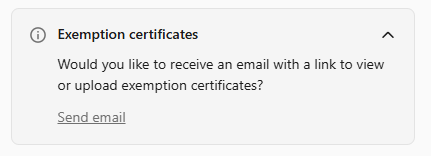
- Select: “Send email.”
- You will receive an email at the address on the account.
- Upload Your Certificate
-
- Follow the directions in the email to upload documents using the link provided.
- Click the Add an exemption certificate button.
- Choose your file (PDF, PNG, or JPG) from your device.
- Ensure the certificate is clear and includes all required details, such as:
- Business name
- Tax ID or exemption number
- State or jurisdiction
- Expiration date (if applicable)
- Drag and drop your documents or select browse Instead to upload a document
Troubleshooting
Certificate upload failed:
- Ensure your file is under the maximum size limit (typically 10 MB).
- Verify that the file format is supported (PDF, PNG, JPG).
- Check your internet connection and try again.
Approval is taking longer than expected:
- Contact sales@pawprosper.com with your business name and email.
Unable to find the tax exemption section:
- Make sure you are logged in with your wholesale account on www.pawprosper.com.
Need Help?
If you have questions or experience any issues, contact the Paw Prosper sales team via the Contact Us page or email sales@pawprosper.com.
Additional Notes
- Only approved certificates are valid for tax exemption.
- Keep your certificates current to avoid unnecessary tax charges.
- Paw Prosper reserves the right to request additional documentation if needed.
- * Sales tax credits apply only to orders placed after certificate approval; we do not credit back tax on orders placed prior to approval.